
Read our review of the customer support journey when installing a new Virgin Media router.

What is the AAWE Score?
The AAWE Score is calculated by rating initial customer expectations as well as the reality of their experience, both out of 10. We then work out the difference between the two scores to give the final result.
Customer Support from Virgin Media
The Expectation
Receiving a new router is always a slightly underwhelming experience. A bit like when you’re told to install updates on your laptop. It’s a job you could do without as what you currently have is doing the job.
But as we’ve been Virgin Media customers for some time, and never had a serious issue, we anticipated this journey to go smoothly. When you add to this the fact that Virgin are consistently good at communicating their brand no matter the touchpoint, we had slightly higher than average expectations.
Expectation Score: 6/10
The Reality
An avoidable false start
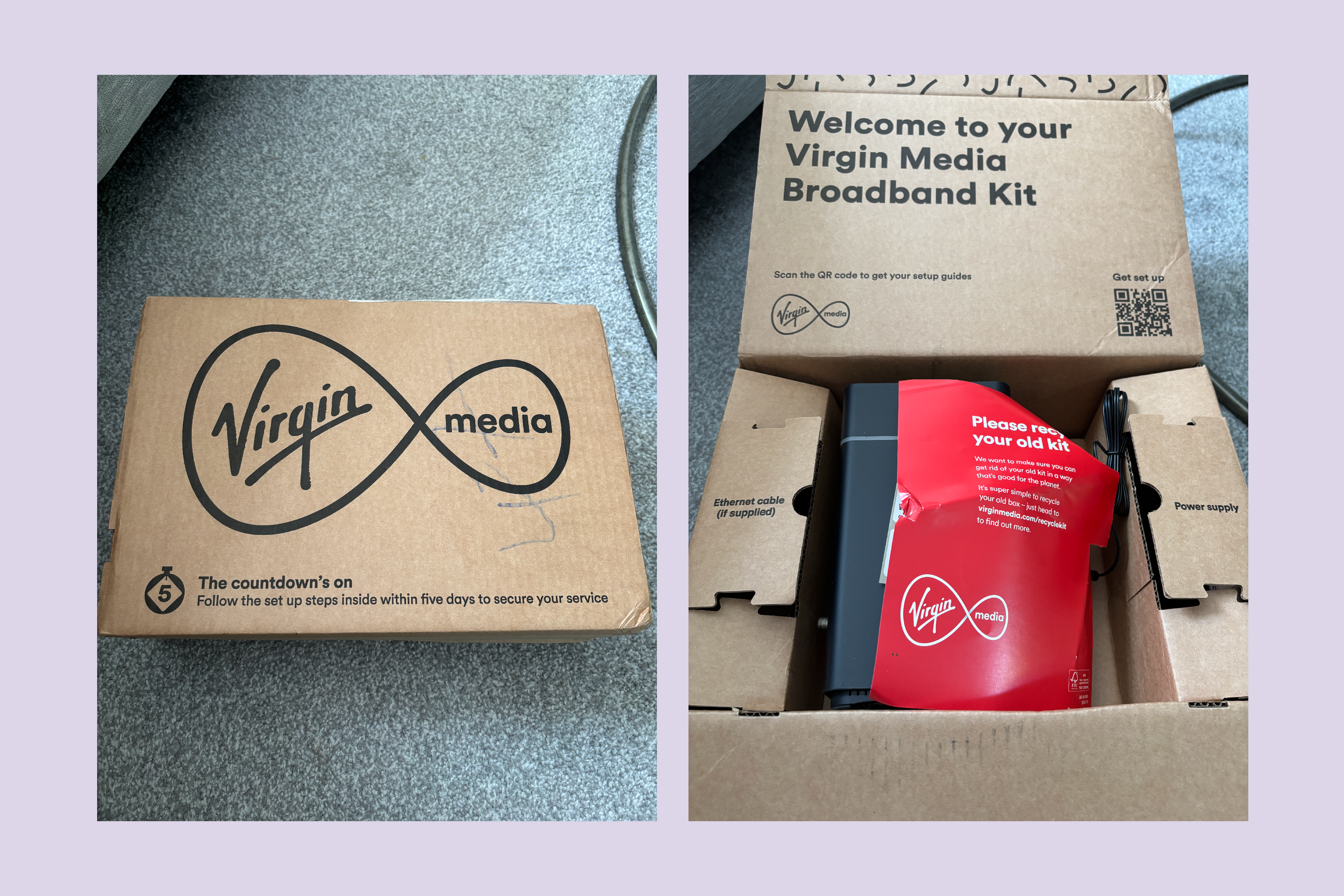
When the router arrived, it was in a brown cardboard box. A functional choice, but one which is understandable for a router upgrade. For new customers, a more branded approach may be more appropriate.
A note to recycle our old router was placed inside the box. It was in fact the most branded item and had been slightly damaged while in transit. Not a great look. The setup guide was printed on the box and easy to follow. A QR code was also provided which directed you to a webpage to receive setup instructions as a step-by-step guide or instructional video.
The labelled compartments were a nice touch, but one compartment labelled ‘Additional items’ was empty. Which put a small sense of doubt in our mind that items which should be there weren’t.
We initially followed the instructions on the box. After completing them, our router wasn’t working and was flashing red. Not a good sign. Then we saw the problem.
On the router of the box a line of copy read ‘Follow the setup steps inside within five days to secure your service’. It had been over five days since we received our router. The line of copy had gone unnoticed and even if it had been, the copy wasn’t clear. As an existing customer, why would we need to secure our service?
All bases covered
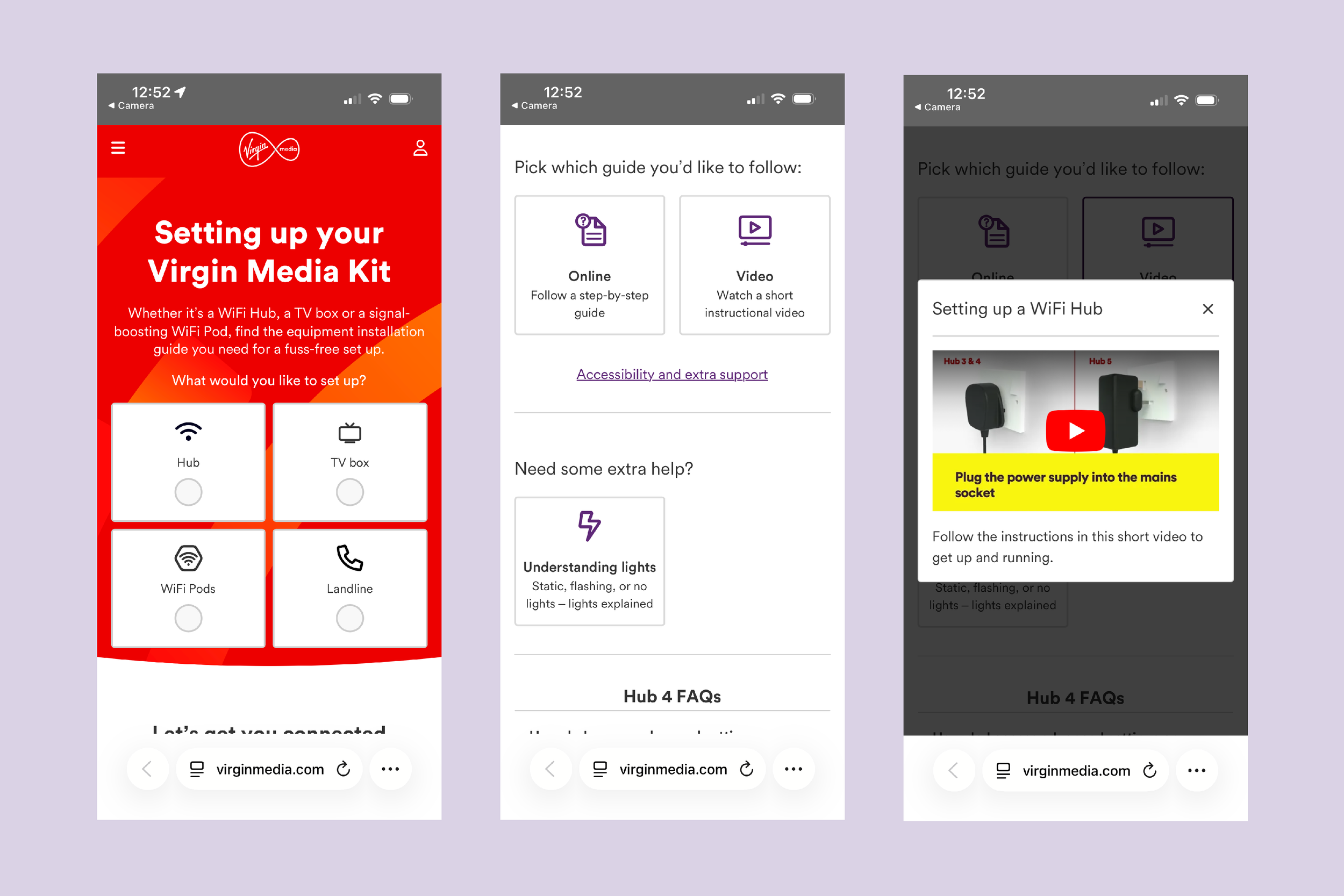
We followed the steps outlined in both the instructional video and step-by-step guide in the hope we would get a different result. Unfortunately, our router still failed to connect.
Nonetheless, the instructions themselves were easy to follow and well presented. The ability to choose between a guide or video was also appreciated.
That being said, there were moments which caused some avoidable distress. For example, we were told to use a spanner provided with the original router to disconnect it. That router was provided over two years ago. We assume like many others would do, the spanner had been discarded. Despite our worry that we had made an error in uninstalling the old router, this proved not to be a cause for concern.
A clear path to follow
Despite the challenges in getting connected, there were clear next steps presented at every point. None of these felt at all circular either. Which is often the case when trying to self-serve a customer support issue. The only thing lacking was visibility of what the lights on the router meant. This resulted in us googling to find the answer.
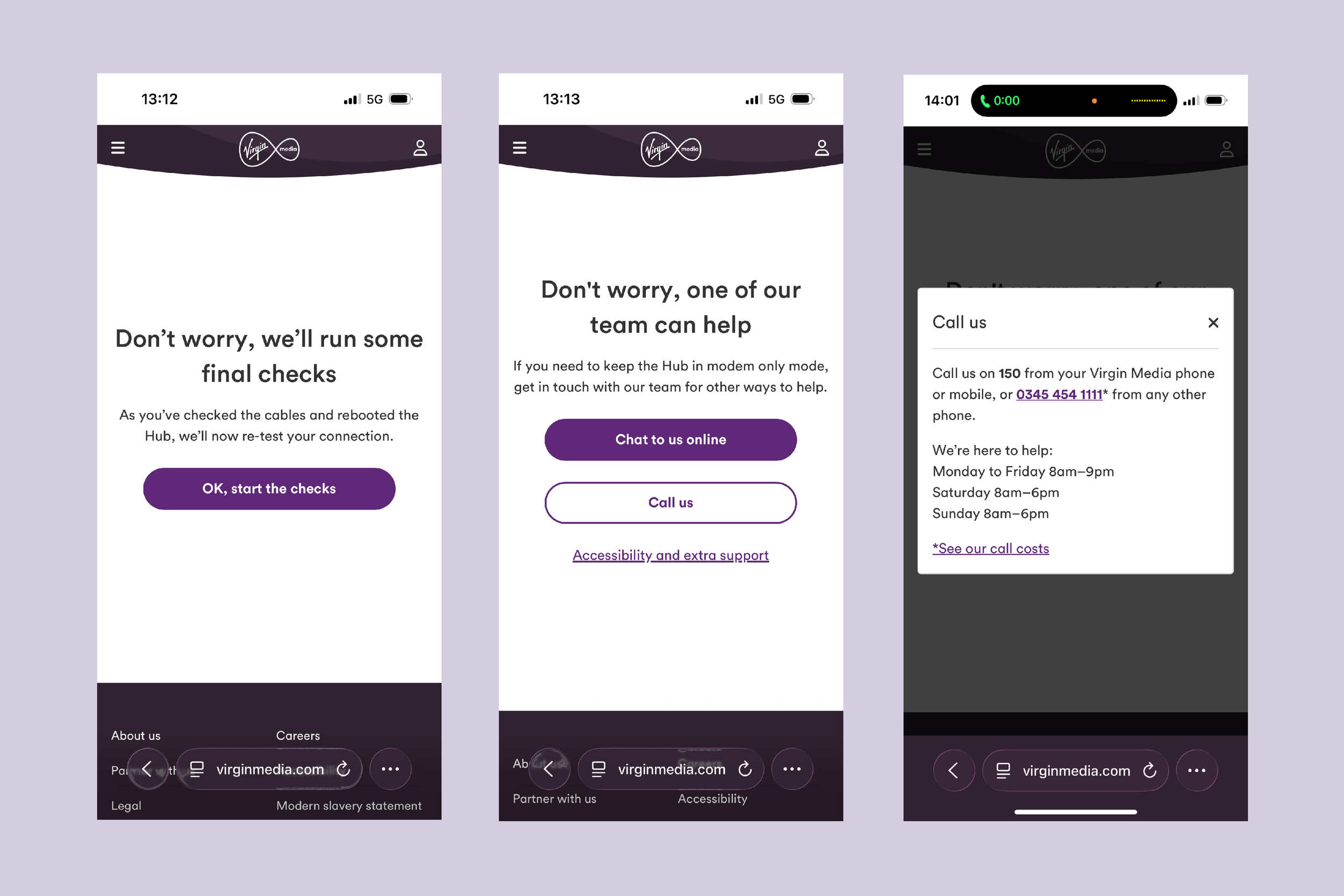
Checks were done on our account, the service in our area, and finally our home. Then a set of troubleshooting steps were presented before another round of checks were completed. At this point, the option to contact a member of the support team was offered. We had the choice between chat or call.
Kudos have to be given to Virgin Media here in that they actually provided a phone number to use which simply needed to be tapped to start the call. We’ve seen so many companies do everything they can to avoid customers phoning to reduce costs. But here was an example of where the option needed to be provided with as little friction as possible.
Support which felt supportive
Going through the automated system we had to provide some account information such as our Account Number and Area Reference. Anticipating some kind of information would be needed we had previous emails to hand which had this information on them.
Then something really interesting happened. We were told by the automated system that they know of an issue on our account and will be transferring us to a colleague. When we completed the checks online, we provided our account details. The fact that they were aware of our online experience when we picked up the phone and provided a fast-tracked experience for us has to be celebrated.
When we got put through to a colleague they maintained a positive tone and took us through a few steps to see if they could rectify the issue. We were told they would attempt to send a ‘manual provision code’ to our router. Now, I had no idea what that meant or how that would work. But we tried it and it didn’t work.
At that stage, the only option was to have an engineer visit. This was booked at the earliest available opportunity which meant we’d be without wifi for little over a day. Frustrating but compensation was offered for the time we were without service.
Reality Score: 6/10
The AAWE Score
Reality Score (6/10) - Expectation Score (6/10) = 0
Reality Score (6/10) - 0 = AAWE Score (6/10)
Opportunities for growth
A score of 6 may seem generous. But challenges happen in customer experience. Customers are not rational creatures and so you will find it difficult to eradicate every potential reason for a customer support journey. What Virgin Media did well was provide a clear and interactive experience with small touches which improved the overall journey.
There were opportunities missed however. Here’s an overview.
1. Leave no room for doubt
The biggest opportunity is in improving the message that the new router HAS to be installed within five days of receipt. By getting this message across clearly, there would be no need for us to have contacted them in the first place. It should be the most notable piece of information on every email before delivery, the box should display it clearly with copy which leaves no room for doubt, a follow up email should be sent four days after the router is received to confirm if the router has been installed.
2. Don’t assume anything of the customer
Asking the customer to locate a small spanner which they received more than two years ago is unnecessary. It would also have been helpful to be told what the lights on the router mean in context of the journey. Especially when dealing with a customer support journey, you can never assume anything of the customer.
3. Avoid internal jargon
The only thing we would change about the way in which the colleague interacted with us is the use of the term ‘manual provision code’. This is a phrase which means nothing to use. We don’t need to hear it. Instead, simply say something like ‘I’m going to try and reset it from here’. That’s all the information the customer needs.
Get our Newsletter
You can see a summary of all our future AAWE Scores in our regular newsletter, Touchpoint, along with CX tips, details of future events, and more. If you’re not already on our mailing list, you can sign up.