
AAWE Score: Trainline/LNER
Read our review of a Delay Repay compensation journey and how two brands work together to offer what was a poor experience.
What is the AAWE Score?
The AAWE Score is calculated by rating initial customer expectations as well as the reality of their experience, both out of 10. We then work out the difference between the two scores to give the final result.
Delay Repay compensation journey from Trainline and LNER
The Expectation
I’m sure you know the feeling, a Train Manager gets on the announcement system to let you know there’s some disruption on your line and your train is set to be delayed. It’s common on UK trains. But when you’re delayed by anything more than 30 minutes, you should be eligible for a partial refund. This happened to us recently when travelling from London to Leeds. We had to take three trains and arrived nearly an hour late.
Eligibility aside, we expected this process to be a difficult one. From experience, anything involving compensation is typically made more difficult than it has to be in the hope that you simply don’t bother. Regardless, we were determined to see it through. With all the information at our disposal to get the refund we deserved, we hoped the journey to receive compensation would simply be a case of a few minor challenges. But one which could ultimately be completed.
Expectation Score: 4/10
The Reality
Now for the reality.
The train ticket was purchased via Trainline using their app. So we used the app as our starting point. We easily navigated to our tickets but that’s where the problems began.
No option was presented to claim delay repay compensation, this is despite receiving an email from Trainline stating we may well be eligible. The ‘Refund’ option provided stated that no refund could be given as the tickets had been used. So the only available option seemed to be to begin a chat with the ‘Travel Assistant’.
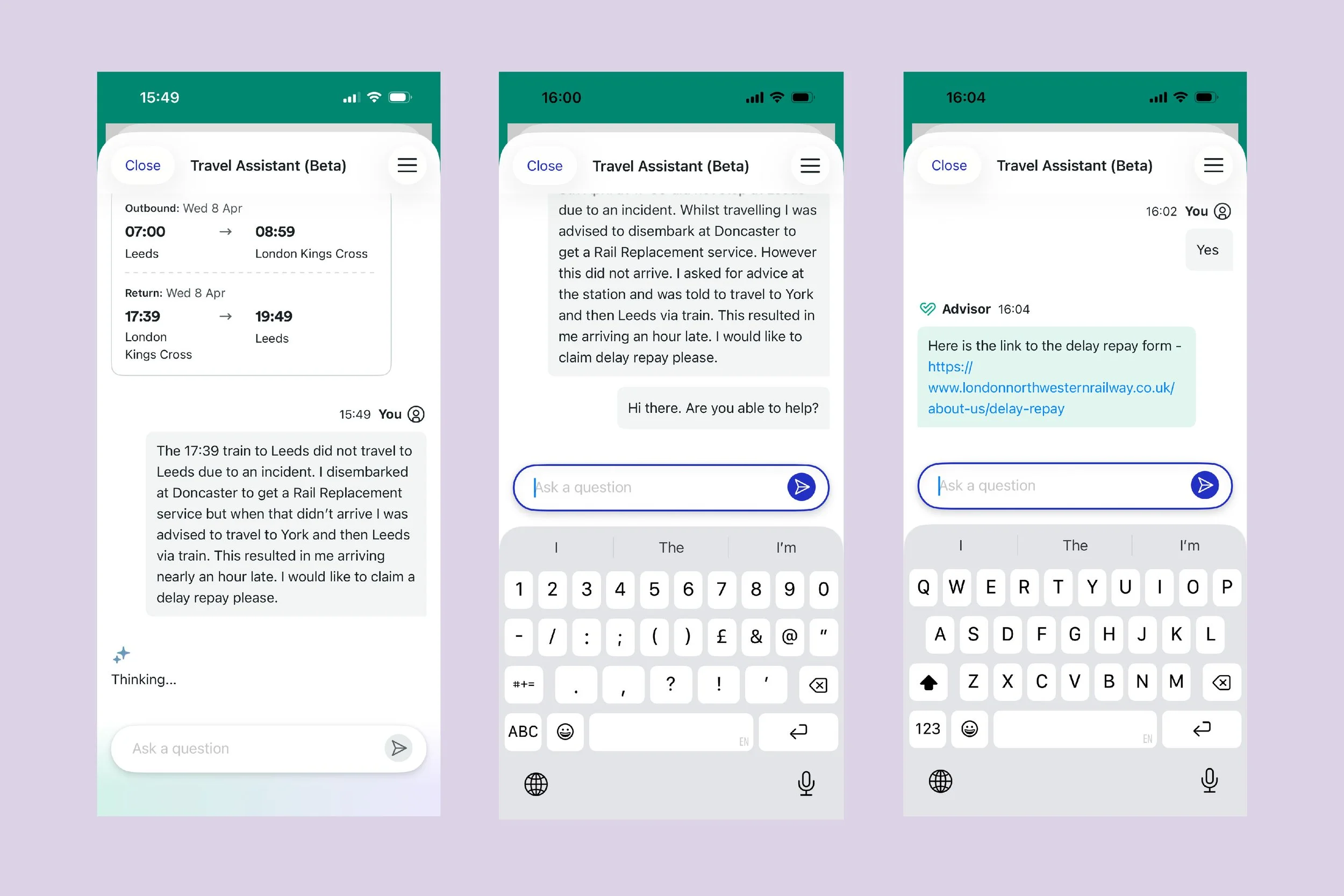
The button to begin the Travel Assistant chat was on the same page as the ticket information. Nonetheless, our ticket information didn’t seem to be shared with the assistant. It quickly became apparent that we were chatting with AI as after letting them know what had happened we were transferred to an Advisor.
After being transferred, we were forced to share all our information once again and wait for 11 minutes for them to respond. We were then provided with a link to the wrong train operator's delay repay form. This was then corrected after we stated we were travelling with LNER.
We also unknowingly gave them the incorrect travel dates which weren’t corrected. So goes to show how much attention they were paying.
To have to go through all of that simply to be provided with a link to a website we could have found on our own was a very poor start.
A lack of empathy
On starting the process with LNER, we were still optimistic. We knew we were in the right place now and had all the information we thought we’d need, such as our e-ticket and the time we arrived in Leeds.
However, things started to become difficult when we were asked to provide the details of the trains we had to take after it was announced our original train was no longer travelling to Leeds.
The default option which seemed to be the only one shown was for if our train from London had been cancelled. We were asked which later train from London we had taken, which wasn’t the case. So we had no option but to manually input every step of our actual journey.
To share details of our journey, we had to state specifically the exact trains we travelled on. This doesn’t account for the stress and steps required when having to plan a new route when already travelling. After having to get off our train in Doncaster, and waiting for a Rail Replacement coach (which didn’t arrive) we had a chat with LNER staff who stated we should get the next Edinburgh train, get off at York, and travel back to Leeds. We were never told the times of trains, we simply sprinted for platforms as and when we saw the destinations of trains on the departure boards. To be expected to remember days later the advertised departure times of the trains we ended up catching, not allowing for if they were delayed, seemed unrealistic.
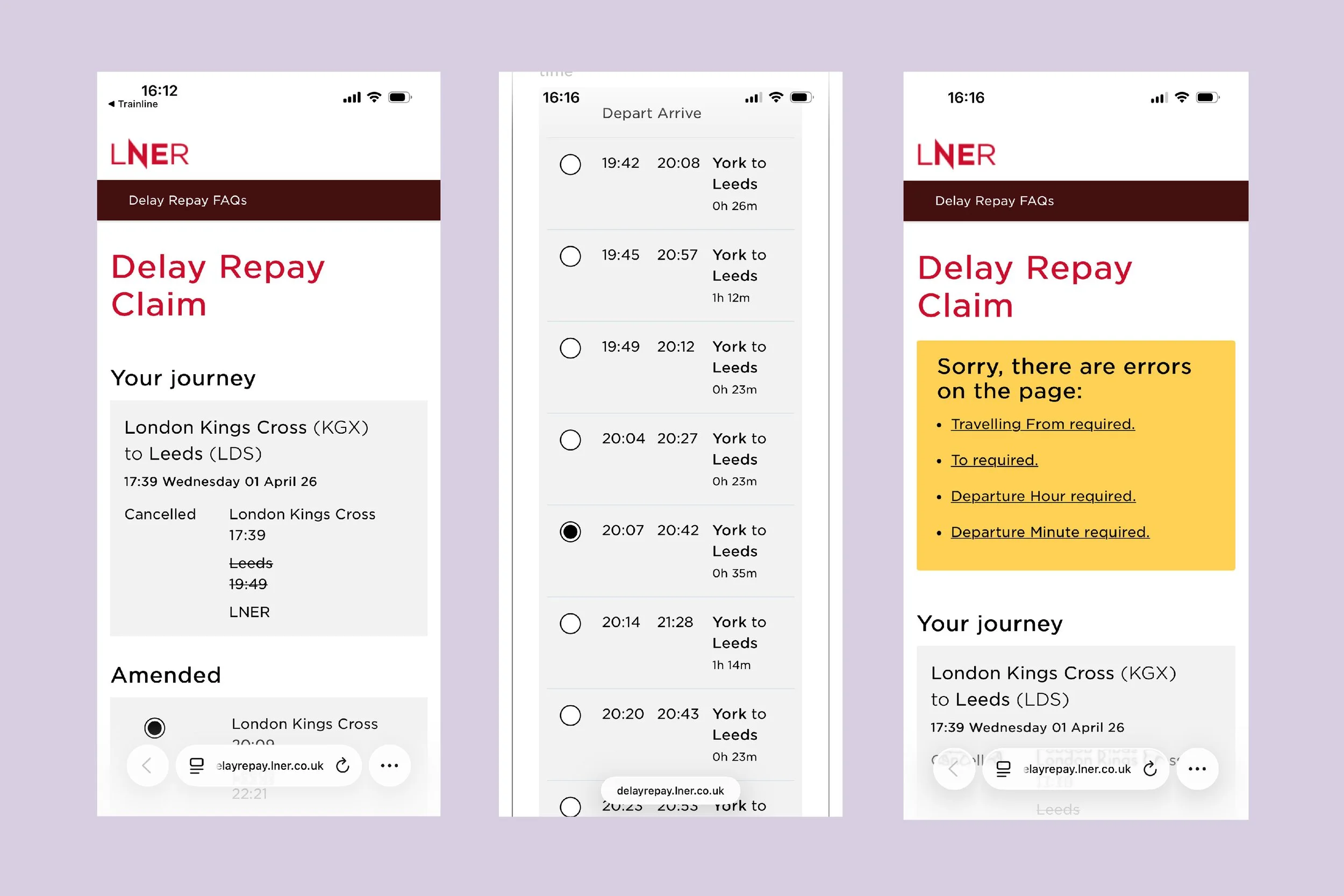
Nonetheless, we were able to piece together the journey we made. We worked our way through problems with the form such as when we selected we had made two changes, one in Doncaster and another in York, and the form wouldn’t let us continue unless we provided the details of three additional trains. The reason for this is still unclear.
The Burden of Proof
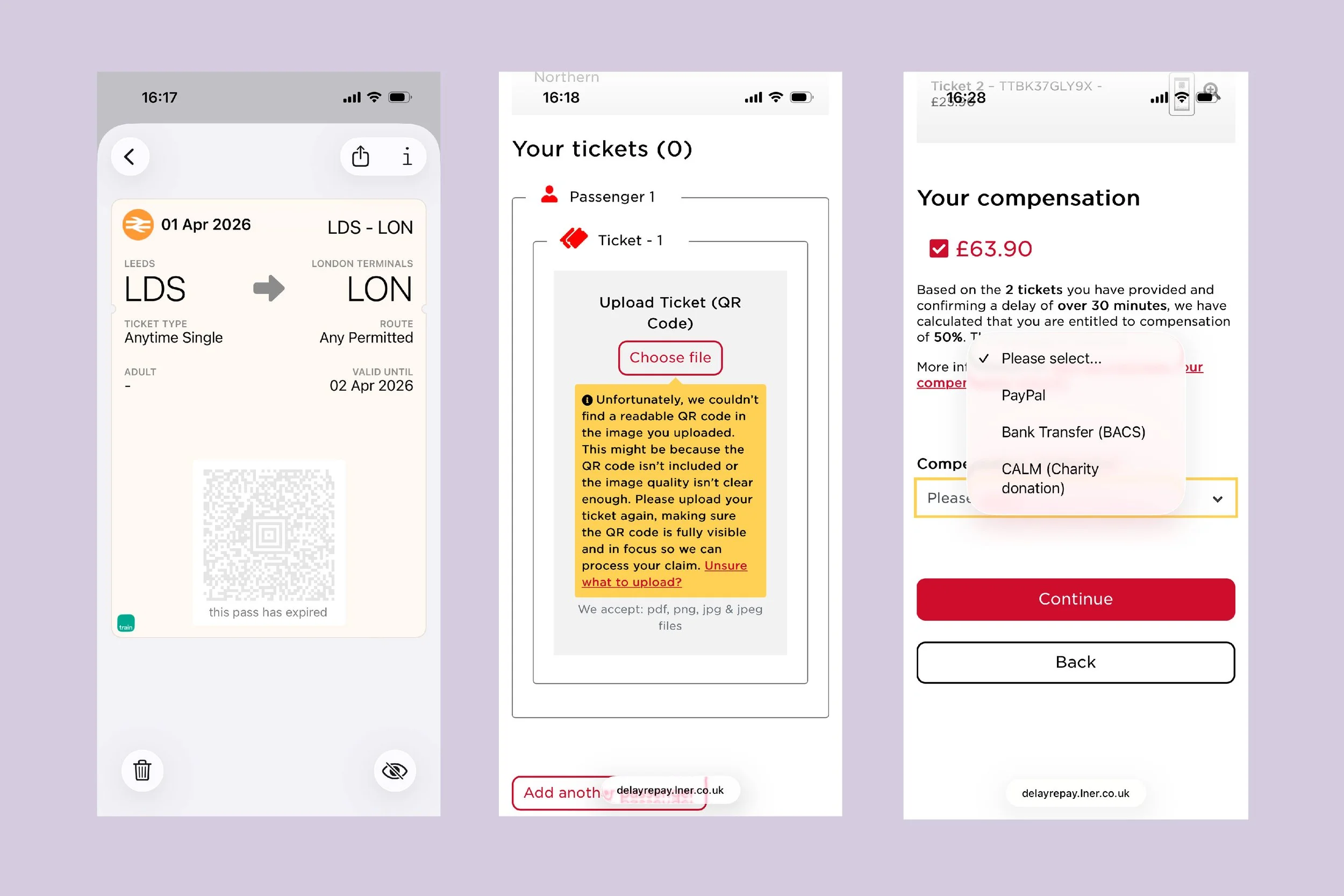
Once our trip information was given we were told we were able to progress and asked to provide our e-tickets. The tickets we used were added to travel from the Trainline app were in our Apple Wallet. However, the QR code used to scan the tickets had expired and so when attempting to upload these we were presented with an error message.
This resulted in us having to read multiple bits of information across both Trainline and LNER to understand where we could locate a version of our e-ticket which would be accepted. At this point, we seriously considered quitting. That’s most likely the intended customer reaction to these challenges. After a Google search, we discovered a version could be found on our original confirmation email from Trainline. We downloaded the attachments and successfully uploaded them to the online form.
Further progress in that we were told we were eligible for a refund worth £63.90. Now all we had to do was state how we would like to receive it. Confusingly, there was no option to have the amount refunded to the card which made the purchase. Instead, we had to select between PayPal (we don’t have an account), a Bank Transfer (who knows their Sort Code and Account Number?) and a Charity Donation. Although a Charity Donation would have been the most satisfying, we wanted to see the process through in its entirety so we dug out some bank account details and selected that option.
Finally, after providing some contact details, our form was submitted. Instead of being told if our claim had been successful, it had to be reviewed by a Customer Service Agent. We could expect the review to be completed in the next 10 working days and once approved, expect to receive our compensation up to 14 days after that.
So after taking 45 minutes to complete a process across a total of 65+ screens, we would have to wait as many as 24 days before receiving compensation. Not good enough.
Reality Score: 2/10
The AAWE Score
Reality Score (3/10) - Expectation Score (4/10) = -1
Reality Score (3/10) - 1 = AAWE Score (2/10)
Opportunities for growth
Growth in the context of a journey to claim compensation may be difficult for some to consider. After all, if LNER stopped as many customers as possible from claiming, they would see financial growth as a result. But it is this type of thinking which has resulted in the sub standard journey as it is today.
Instead, there are opportunities to improve this journey. You can build empathy with customers, provide a reason to purchase via LNER directly, and reduce costs by increasing efficiency. All of which will result in growth. For these opportunities we’ve focussed on LNER as they have the most potential for growth as the provider who ultimately pays the compensation.
1. Simplify how customers provide their travel details
The only information which is relevant to whether or not you are eligible for compensation is whether your journey was completed, and at what time. Given the likely stressful nature of any delayed journey, customers shouldn’t have to provide the exact details of every train they had to take to complete their journey. Customers should simply be asked to provide the broad details of how they travelled alongside the specific details of when they arrived. Then a summary of a potential journey could be shared and confirmed with the customer. This will reduce friction and help build empathy with customers.
2. Offer an option for customers who have purchased via LNER directly
It’s difficult to think of a reason to book directly with LNER. They don’t offer Split Fare tickets and so are often a more expensive option for a trip to London, for exactly the same product. There is an opportunity to create a Delay Repay journey for customers who book directly with LNER. For example, if I knew by booking via LNER whenever I experienced a delay, I’d have a simple form to fill in, and my compensation would be processed in a matter of a day or two, I’d be much more likely to book directly. This would be great for a customer, but also increase LNER’s direct sales.
3. Remove the need for a Customer Service Agent review
In a digital world, and increasingly AI world, the need for a Customer Service Agent to review every compensation claim is not required. If a customer can upload their e-ticket, and there is a record of the ticket being scanned, then compensation should be paid. This process can all be automated. To make this process simpler for both the customer and LNER, the option to refund the payment method used to book the ticket should also be offered.
Get our Newsletter
You can see a summary of all our future AAWE Scores in our regular newsletter, Touchpoint, along with CX tips, details of future events, and more. If you’re not already on our mailing list, you can sign up.